 DROIDLESS
Run Android apps without Android.
Android apps.
Meet desktop.
A notes app. A new habitat. 🤖
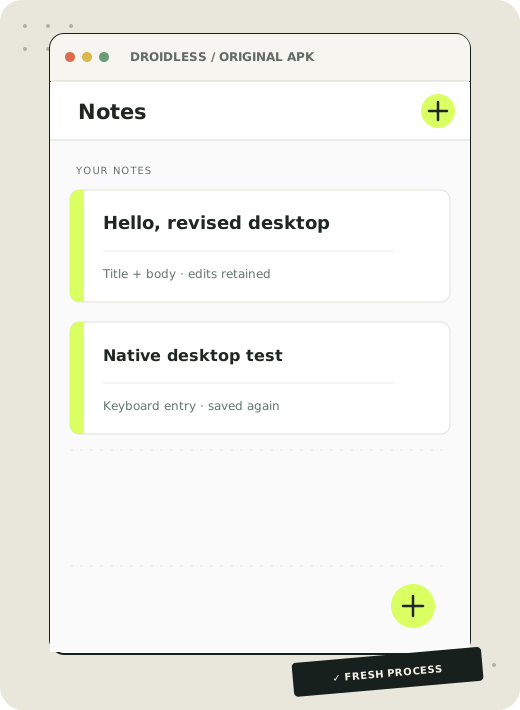
Save a note. Open it again. Change its title and body. Restart, and your edits are still there — through the original Notepad APK. ✍️
Experimental preview · macOS ARM64 · limited Android API subset
 NO ANDROID
UNDER THE HOOD
🧮 Native calculator clicks · 📓 two saved notes after restart.
Real APKs.
Real app code.
The independently published Simple Calculator 1.0 APK still proves native click callbacks and results. The arithmetic below was observed in a macOS window.
The unmodified Notepad 1.0.0 APK saves two notes, reopens one for title/body editing and restores both fields after a fresh process in headless replay. Native AppKit checks also select an existing note with the mouse, type both fields, save through Back and reopen the exact edits in a fresh process. The preview is an illustration, not a desktop screenshot.
Notes → editor → save twice → fresh process. Both SQLite rows survive; both titles return after Back and appear again in a second DROIDLESS process. Headless replay also opens the original drawer and closes it with Back while preserving both rows.
Native mouse selection, keyboard title/body edits, Back save and fresh-process restoration also passed in an AppKit window. Native drawer input remains unverified. The vector preview is illustrative; visual fidelity remains open.The calculator capture is a real native window at a 192 × 400 logical viewport; seven headless cases check more calculations. Styling and table layout are approximate. Notepad was replayed headlessly at 390 × 844 and accepted native AppKit keyboard input. Its vector preview is illustrative. Open the verification record ↗
⚙️ Follow the bytecode.
Tiny workspace.
Big responsibility.
DROIDLESS owns the execution path. Three crates turn an APK into guest objects, a View tree and native controls.
- 01 / UNPACK THE IDEAS
Read the APK
Parse ZIP contents, binary XML, resources and DEX modules without extracting guest files.
droidless-formats - 02 / DO THE WORK
Run its code
Interpret registers, objects, method calls, dispatch and exception handlers in Rust.
droidless-runtime - 03 / BUILD THE BRIDGE
Translate APIs
Supported Activity, resource, layout and View calls produce a desktop View tree.
Android compatibility - 04 / HELLO, DESKTOP
Go native
AppKit renders controls. Mouse, text and key events return to the app’s own bytecode.
droidless / macOS
Every supported click goes back through the guest runtime. Current execution is interpreted; no JIT or Android engine is embedded.
🧭 Still a lot of road ahead.
Small wins.
Real progress.
Start with one app doing something useful. Expand the compatibility surface with executable evidence.
The native calculator
Original APK logic, real clicks, UI updates and clean exit.
Everyday Android apps
Multiple screens, persistent data, lists, images and scheduled callbacks.
Milestone labels, not measured Android API coverage. Independent note save/restart and folder → thumbnails → viewer → Back are proven; broader everyday-app workflows remain ahead of the 50% target.
Fresh from the lab: the original Notepad APK saves, reopens and edits notes natively. 🗂️ Headless replay creates and renames folders, preserves the same folder ID across restart and keeps both notes exact. 🪟 Dialogs now use separate native panels with guest lifecycle/input checks. Headless replay now shows the original folder-delete confirmation: Cancel keeps the folder, Delete Folder removes it, and restart/Back preserve both exact notes. Native focus component checks cover selection and key-view traversal; physical folder input remains unverified. 🖼️ SwpieView opens selected-folder photos natively and returns with Escape. v0.3.0 adds bounded staged output, file-channel transfers and the unchanged Notepad APK backup/restore flow. The exact database is recovered and displayed after relaunch. Current main maps System.exit(0) to CLI status 0; the tagged v0.3.0 archive retains the earlier exit boundary.
Current scope ↗🚀 From source to window.
Bring an APK.
Get curious.
Build with Rust 1.95.0 and Apple’s Command Line Tools on macOS. Android SDK tools are only needed to rebuild authored test fixtures.
Open the runtime notebook ↗git clone https://github.com/OthmaneBlial/droidless.git
cd droidless
cargo build --release --locked
sh tools/fetch-notepad.sh
target/release/droidless run --headless --ephemeral --size 390x844 \
--click "+" --input "Hello, desktop" artifacts/apks/notepad-v1.0.0.apkThis reproduces the headless editor proof. Ready-built preview: macOS ARM64 v0.3.0 archive + checksums ↗
Includes five authored fixtures and original public APK fetch helpers. No Apple signature or notarization.
Experimental, with a limited API subset. v0.3.0 adds staged, package-confined file output and bounded FileChannel transfers. The unchanged Notepad APK restores a tampered database byte-for-byte. Current main returns status 0 for its System.exit(0); the v0.3.0 archive retains the earlier boundary. General file APIs, AndroidX, Compose, native libraries, networking, JIT and games remain future work. Linux has an unverified headless path and no native GUI. Use trusted APKs; this prototype is not a security sandbox.
Read the exact limits ↗